

It is the most common complaint in every ISP's inbox: "I upgraded to 100 Mbps and my phone still shows 12!" Here is the part nobody explains — the line and the experience are two different things, and the gap usually lives inside the house.
Follow the speed through your home
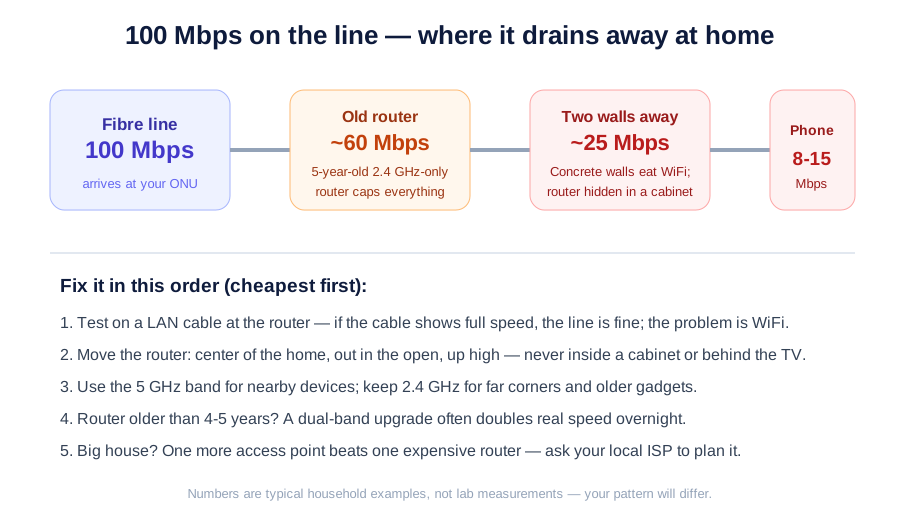
The fibre delivers its full speed to the small box on your wall (the ONU). Then the obstacles begin. A five-year-old router that only speaks 2.4 GHz caps everything at a fraction of the line speed. Two concrete walls later — Indian walls are WiFi's natural enemy — half of that is gone. Add a router hidden inside a wooden cabinet "for looks", a crowd of neighbours' networks on the same channel, and one old phone, and the plan you pay for never stood a chance.
Find the guilty party in five minutes
Connect a laptop to the router with a LAN cable and run a speed test. Full speed on cable? The line is healthy — your problem is WiFi, and it is fixable at home. Slow even on cable? Now it is a line issue worth a support call.
The fixes, cheapest first
Move the router: center of the home, in the open, up high — never behind the TV or inside a cabinet. Use the 5 GHz network for nearby devices (faster, shorter range) and 2.4 GHz for far corners. If the router predates your last phone by years, a dual-band replacement often doubles real-world speed overnight. Big house? One additional access point beats one expensive router — every time.
The plan is the pipe; WiFi is the plumbing inside. Upgrading the pipe cannot fix a choked tap.
For local ISP operators reading this: half your support calls are this exact article. Our Sanchar Suite lets your field team diagnose with geo-tagged visits and speed-test proof — and educating customers with content like this cuts those calls at the source. Feel free to share it.