
Services

WhatsApp for your business, the official way

Order updates, OTPs, appointment reminders, support and even checkout — delivered on the official WhatsApp Business Platform (Cloud API). We engineer the integration end to end: approved templates, a shared team inbox, bots with human handoff and in-chat commerce, built to keep your number healthy and Meta-compliant.
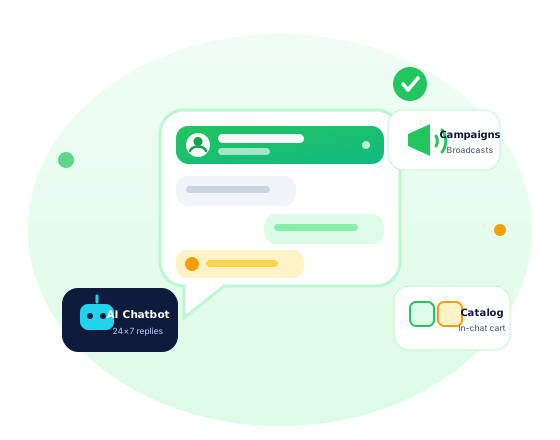
WhatsApp Business API — notifications, shared inbox, chatbots and commerce
The Official Platform

Meet customers inside the app they never close

Serious businesses do not run on a spare phone with WhatsApp Web. The WhatsApp Business Platform (Cloud API) is Meta's official, programmable interface — approved templates, webhooks, multi-agent access and commerce — and we wire it straight into your software.

From notification to checkout, one thread

Order confirmations, delivery OTPs, appointment and fee reminders go out as approved templates the moment your app, store or ERP fires the event. Catalogs, carts and payment links then let customers finish the purchase without leaving the chat — a natural fit for UPI-first buyers across Lucknow and Tier-2 India.

Customer completing a payment on a phone
Support team collaborating on customer conversations

One verified number, your whole team

The API removes the one-phone bottleneck: agents share a single inbox with assignment, labels, internal notes and working-hours rules. Conversations stop living on staff members' personal numbers, and every reply is logged, auditable and on-brand.

How access works: Addroit Nexus engineers and operates the integration; platform access, messaging and verification are provisioned through licensed Business Solution Provider (BSP) partners on official rails. Meta's Business and Commerce policies and the BSP's terms apply to all traffic.
What We Build

Six capabilities, one healthy number

Transactional notifications

Order status, OTPs, appointment and fee reminders via pre-approved templates — triggered by API from your app, store or ERP the moment something happens.

Multi-agent team inbox

One verified number, many agents: assignment, labels, notes, canned replies and shift-hours autoresponders — with a full audit trail of who said what.

Chatbots with human handoff

Menu bots for the routine, AI-assisted drafts for the rest — and a human takes over in one tap with full conversation context. Nobody argues with a bot at 2 am.

WhatsApp commerce

Product catalogs, carts and payment links inside the chat, with order state synced back to your store or app — browse to buy without a single redirect.

Opt-in broadcast campaigns

Offers and updates to customers who explicitly said yes — segmented, frequency-capped and unsubscribe-clean, so reach grows without burning your list.

Verification & green tick

Business Manager verification, display-name compliance and Official Business Account (green tick) application support — prepared properly, submitted honestly.

Built Into Your Stack

The API is half the job — integration is the other half

A WhatsApp line that does not know your orders, slots or fee dues is just another phone. We connect it to the systems that actually run your business.

Shops, dark stores & gig platforms

Order-received pings, rider-assigned updates, delivery OTPs and payment links — wired into the SaaS shop & gig applications we build and run, so hyperlocal commerce talks to customers by itself.

E-commerce & D2C brands

COD-confirmation flows that cut RTO, shipping and delivery updates, opt-in win-back campaigns and in-chat catalogs — a natural extension of our e-commerce solutions.

Clinics, labs & diagnostics

Appointment booking and reminders, report-ready alerts with secure document delivery, and recall campaigns — with consent records kept DPDP-aware from day one.

Coaching & EdTech

Batch schedules, fee-due reminders, test results and parent updates for the test-prep belt of UP — integrated with the EdTech platforms we engineer for institutes.

Compliance First

We protect your quality rating like production uptime

Meta continuously scores every business number. Let block rates climb and your messaging tier shrinks, templates get rejected — or the number is banned outright. Most WhatsApp trouble is self-inflicted spam; our job is to make that impossible.

  • Opt-in captured with timestamp, source and proof — stored for every recipient
  • Frequency caps and quiet hours by default; campaigns throttle before fatigue sets in
  • STOP and unsubscribe honoured instantly and synced across every list
  • Templates pre-reviewed against Meta policy before submission — fewer rejections
  • Quality-rating and block-rate monitoring with automatic pause thresholds
  • New numbers ramped gradually so messaging limits grow instead of collapsing

Rules we never break

100% opt-in lists No purchased databases No blast-and-pray campaigns Meta Commerce Policy respected DPDP-aware consent records

If a campaign would risk your number, we say no and propose a compliant route — that discipline is a large part of what you are paying for.

Go-Live Path

Live in five verified steps

Verify

Business Manager and number verification with the BSP; display name set per Meta rules.

Templates

Utility, authentication and marketing templates drafted, pre-reviewed and submitted for approval.

Integrate

Cloud API and webhooks wired into your app, store, CRM or ERP — sandbox first.

Automate

Bots, inbox routing, escalation and campaign flows configured and rehearsed with your team.

Measure

Delivery, read and reply dashboards; quality rating watched 24×7×365.

90%+
Open rates industry-reported for WhatsApp messages
24×7
Bot coverage for FAQs, bookings and order status
5 min
Human handoff target during staffed hours
100%
Opt-in policy on broadcast lists — no exceptions

Measured like a channel, not a gimmick

Every flow reports delivery, read and reply rates; every campaign reports revenue per segment; every agent shift reports response times. You see what a marketing conversation costs and what a reorder is worth — so WhatsApp earns its budget the same way any other channel must.

Campaign and conversation analytics dashboards
Conversation Pricing

Pay per conversation, not per seat

Meta bills WhatsApp by conversation category, not by agents or devices. Replies inside the 24-hour customer-service window are free; business-initiated templates are metered by type.

CategoryWhen it appliesIndicative rate*Typical uses
MarketingBusiness-initiated template with promotional content₹0.85 – ₹1.10Offers, festival pushes, win-back nudges
UtilityBusiness-initiated template tied to a transaction₹0.12 – ₹0.24Order status, delivery alerts, fee reminders
AuthenticationOne-time-passcode templates₹0.12 – ₹0.18Login and transaction OTPs
ServiceCustomer messages first; replies within the 24-hour window₹0 (free)Support chats, order queries, follow-ups
*Indicative only: Meta revises rates and category definitions from time to time — exact per-message rates, BSP platform fees and our integration and management fee are quoted in writing at signup. GST extra.
FAQ

WhatsApp Business API — straight answers

Can I use my existing WhatsApp number?
Yes — the number is migrated from the WhatsApp or WhatsApp Business app onto the API. Chat history does not carry over and the number can no longer be used inside the app afterwards, so we plan the cutover carefully: export what you need, switch in a quiet window, and test before you announce. A fresh virtual number is also a clean option.
How do we get the green tick?
The green tick (Official Business Account) is granted by Meta, never sold. It needs completed business verification plus notability — credible public coverage of your brand. We finish Business Manager verification, assemble the notability evidence and submit through the BSP. We improve your odds honestly; nobody can guarantee approval, and anyone who promises it is overselling.
How long does template approval take?
Typically minutes to 48 hours per template. Rejections usually trace to policy issues — promotional wording in a utility template, missing opt-out language, formatting mistakes. Because we pre-review every template against Meta policy, most of ours pass first time; when one bounces, we rework and resubmit the same day.
What if my customers have not opted in?
Then we build opt-in before we build broadcasts: checkout and signup checkboxes, QR codes at the counter, click-to-WhatsApp ads, missed-call and website widgets — each recorded with proof. Until someone opts in, they hear from you only when they message first (the free service window). Messaging without consent is where numbers go to die; we simply do not do it.
What does the whole thing cost?
Three layers: Meta's per-conversation charges (billed at actuals, table above), the BSP platform fee, and Addroit's one-time integration fee plus an optional monthly retainer for campaigns, bot tuning and monitoring. Everything is itemised in writing before you commit — write to [email protected] with your monthly volumes for a working estimate.
People Also Ask

WhatsApp Business API — 20 questions, answered straight

The most-asked questions on the web about this topic, answered honestly by our team.

What is the difference between the WhatsApp Business app and the WhatsApp Business API?
The free app suits one person on one phone - manual replies, a basic catalogue, broadcasts to 256 saved contacts. The API is for teams and software: unlimited scale, chatbots, CRM integration, multiple agents on one number and official template messaging. The API has no interface of its own; it runs behind a dashboard or your systems. Rule of thumb: beyond roughly 50 chats a day, or any automation need, you need the API.
How much does the WhatsApp Business API cost in India?
Meta charges per delivered template message and rates change, so verify current pricing before budgeting. Indicatively in India: marketing templates cost the most, roughly ₹0.95–1 each; utility and authentication templates cost a few paise, around ₹0.15; replies inside the 24-hour service window are free. Worked example: 10,000 order-update utility messages cost about ₹1,450 to ₹1,800 plus your provider's platform fee. Always compare both parts.
Is the WhatsApp Business app free to use?
Yes. The small-business app is completely free: business profile, catalogue, labels, quick replies, away messages and broadcasts to customers who have saved your number. You pay nothing until you outgrow it. Costs begin only with the API - per-message charges from Meta plus whatever platform or provider you use to access it. Many Indian shops run happily for years on the free app alone.
How do I get the green tick verified badge on WhatsApp?
The verified badge is granted by Meta to notable, authentic businesses on the API - you apply through your provider or Meta Business Manager with a registered legal entity, a live website and press or public presence supporting notability. It cannot simply be bought, and anyone guaranteeing it for a fee deserves suspicion. Most businesses operate perfectly well without it; focus on response quality first.
Can I legally send bulk WhatsApp messages to customers?
Only through the official API, using pre-approved templates, to users who opted in - and recipients can report or block you, which damages your quality rating and sending limits. Grey-market bulk sender tools that spray messages from ordinary numbers violate WhatsApp terms; those numbers get banned quickly, sometimes within hours, taking chat history with them. The lasting rule: message people who asked to hear from you.
Why did WhatsApp ban my business number and can I recover it?
Common triggers: bulk or automated messaging from a normal app number, high block-and-report rates, unofficial mods like GB WhatsApp, or template abuse on the API. You can appeal inside the app or via Business Manager - reinstatement happens but is never guaranteed. Protect yourself: use the official API for volume, ramp gradually, honour opt-outs instantly, and never let an agency run unofficial tools on your primary number.
What are WhatsApp template messages and why do they need approval?
Templates are pre-written message formats - order updates, OTPs, offers - that Meta reviews before you may send them outside the 24-hour service window. Review enforces category honesty, so a marketing pitch cannot masquerade as a utility update, and it blocks spam patterns. Approval typically takes minutes to a couple of days. Variables personalise each send: Hello {{1}}, your order {{2}} is out for delivery.
What is a WhatsApp chatbot and what can it actually do?
A chatbot answers on your number automatically: menu-driven flows for orders, bookings, fee payments and FAQs, with handover to a human when stuck. Example: a Lucknow coaching centre bot can share batch timings, capture an admission enquiry and book a counselling slot at 11 pm without any staff online. Bots shine at narrow, well-defined jobs; open-ended conversation still needs careful design and a human fallback.
Can I send OTPs and login codes on WhatsApp instead of SMS?
Yes - authentication templates deliver OTPs with one-tap autofill on Android, often faster and cheaper than SMS in India, at a few paise per message with delivery receipts built in. Serious setups keep SMS as an automatic fallback for users without data or WhatsApp. A sensible pattern: send on WhatsApp first, then fall back to SMS after 10 to 15 seconds without delivery confirmation.
What is the 24-hour customer service window?
When a customer messages you, a 24-hour window opens during which you may reply freely with any content, no template needed, at no Meta charge. Each new customer message resets the clock. Outside the window you must use an approved, paid template to restart the conversation. The design consequence: answer fast, resolve within the window, and collect opt-ins so follow-ups remain possible later.
How many messages can I send per day on the WhatsApp API?
New API numbers start with a limit of about 250 business-initiated conversations per day, rising automatically through 1,000, 10,000 and 100,000 to effectively unlimited as you message more users with sustained quality - Meta adjusts these tiers from time to time. High block rates freeze or lower your tier. Practical advice: ramp campaigns over two to four weeks instead of blasting the full customer base on day one.
Do customers have to opt in before I message them on WhatsApp?
Yes - Meta requires documented opt-in before business-initiated messages, collected through a website checkbox, IVR, QR code, in-store form or an existing chat. The opt-in must name WhatsApp specifically, not hide in generic terms. Equally important is easy opt-out: honour STOP instantly, because ignored opt-outs become blocks and reports that wreck your quality rating and messaging limits far faster than they grow your sales.
Can I use my existing phone number for the WhatsApp API?
Yes, including landlines and toll-free numbers, as long as the number can receive a one-time verification call or SMS. Caveat: a number active on the consumer or Business app must delete that account first, and migration surrenders app-side chat history, so export anything you need. Many businesses instead take a fresh dedicated number and keep the old one running for personal continuity.
Can multiple team members reply from one WhatsApp number?
On the API, yes - that is one of its main points. A shared team inbox gives every agent a login on the same number, with chat assignment, internal notes, canned replies and performance reports. The free app allows only a handful of linked devices with no real supervision. Example: a travel agency can run sales, visas and support teams on one number with clear ownership of every chat.
What is a BSP or WhatsApp Business Solution Provider?
BSPs are companies Meta authorises to provision API access - they host the connection or use the Meta Cloud API, manage template approvals and bill you for messages, usually adding platform fees. Since Meta opened the Cloud API, businesses can also connect directly, but most still prefer a BSP or platform partner for the dashboard, chatbot tools and support. Compare per-message markups, monthly fees and lock-in before signing.
Is WhatsApp marketing better than SMS or email marketing?
They are different tools. WhatsApp open rates in India commonly exceed 90% with rich media and two-way conversation, but each message costs more and abuse gets you blocked. SMS remains the cheap universal fallback that needs no data plan; email is best for documents and long-form content at near-zero cost. A sensible Indian stack: WhatsApp for engagement and service, SMS for OTP fallback, email for records.
What are WhatsApp Flows - can customers fill forms inside WhatsApp?
Flows are native multi-screen forms inside the chat - date pickers, dropdowns, text fields - so a customer can complete a booking, detail capture or feedback survey without leaving WhatsApp for a slow webpage. Completion rates beat web forms precisely because there is no context switch. They require API access and restraint in design: keep a flow to three screens or fewer wherever possible.
Is the WhatsApp Business API secure and is customer data safe?
Messages are encrypted in transit under the WhatsApp protocol, but on the API a business endpoint - your provider or cloud infrastructure - necessarily processes messages, so Meta classifies API chats differently from personal end-to-end chats. Practically: choose providers with clear data-processing terms, prefer DPDP-aware hosting practices in India, restrict agent access, and never store OTPs or payment details inside chat logs.
How do I integrate WhatsApp with my website, CRM or billing software?
Through the API plus webhooks: your software calls the send endpoint for order updates and reminders, while incoming replies land in your CRM against the customer record. Common Indian integrations: Shopify or WooCommerce order alerts, payment reminders fed from accounting systems, and lead capture into Zoho or HubSpot. Addroit Nexus builds these integrations - chatbots and shared inboxes included - with API access provisioned through authorised channels.
How long does it take to get started on the WhatsApp Business API?
With documents ready - registered business details, Meta Business Manager verification, and a number free of an existing WhatsApp registration - basic API access can be live within hours to a few days; business verification is usually the slowest step. A working setup with approved templates, chatbot flows and CRM integration typically takes one to three weeks. Scoping with Addroit Nexus is free, and the quote after scoping is fixed in writing.
Quick Query

Have a project in mind? Let's talk.

Tell us what you are building or what is slowing you down — we reply with a clear, honest plan.

  • Response within one business day — usually much faster
  • You talk to engineers, not a sales script
  • Your details stay with us — see our Privacy Policy
Captcha code

By submitting, you agree to be contacted about your enquiry and accept our Privacy Policy. Your query is stored securely and never sold.

Get Started

Let's build something that lasts.

From a single landing page to a rack in our Lucknow edge data center — talk to a real engineer today and get a straight answer.